Quickstart
This page is the fastest path to run Joulie. For conceptual context first, read Core Concepts.
Prerequisites
- Kubernetes cluster with worker nodes
- Node Feature Discovery (NFD) deployed
- Optional for real enforcement: nodes exposing writable power interfaces
- RAPL power limit files, or
- cpufreq sysfs interfaces
Install from release (recommended)
Install directly from OCI chart release:
helm upgrade --install joulie oci://registry.cern.ch/mbunino/joulie/joulie \
  --version <version> \
  -n joulie-system \
  --create-namespace \
  -f values/joulie.yaml
Label nodes managed by the operator
Important: Joulie will only target nodes with a specific label, and ignore all the others. By default, install does not auto-select nodes. Default expected selector value is:
joulie.io/managed=true(operator envNODE_SELECTOR)
So you must label target worker nodes, for example:
kubectl label node <node-a> joulie.io/managed=true --overwrite
kubectl label node <node-b> joulie.io/managed=true --overwrite
If this is missing, operator logs will show no eligible nodes matched selector.
Install from source (when developing)
If you changed source code, from repo root:
make build-push TAG=<tag>
make install TAG=<tag>
This pushes:
registry.cern.ch/mbunino/joulie/joulie-agent:<tag>registry.cern.ch/mbunino/joulie/joulie-operator:<tag>
You can also do build+push+install in one command:
make build-push-install TAG=<tag>
Use make help to see all targets.
Install CRDs + components (source workflow)
If images for TAG are already in the registry (no source changes), run:
make install TAG=<tag>
This performs a Helm install/upgrade (charts/joulie) and sets both images to the requested tag.
Default values come from:
values/joulie.yaml
You can override with:
make install TAG=<tag> HELM_VALUES=<path-to-values.yaml>
Node selection behavior is the same as release install:
- operator expects
joulie.io/managed=trueby default - label target nodes before verifying reconciliation
Joulie will only target nodes with that specific label.
To remove Joulie components and CRD:
make uninstall
Update to a new image tag later
make rollout TAG=<new-tag>
Joulie operator and agents
Joulie control is a desired-state loop:
- operator decides per-node target state and writes
NodePowerProfile, - node labels (
joulie.io/power-profile) expose current supply to the scheduler, - agent enforces node-local controls from desired state and telemetry/control profile.
Meaning of the key node labels:
joulie.io/managed=true- node is in Joulie operator scope (eligible for policy decisions)
joulie.io/power-profile=performance- node currently offers high-performance supply
joulie.io/power-profile=draining-performance- temporary transition state during safe downgrade (
performance -> eco)
- temporary transition state during safe downgrade (
joulie.io/power-profile=eco- node currently offers low-power supply (resources are throttled according to the selected policy)
Read the architecture path after this quickstart:
Architecture overview:
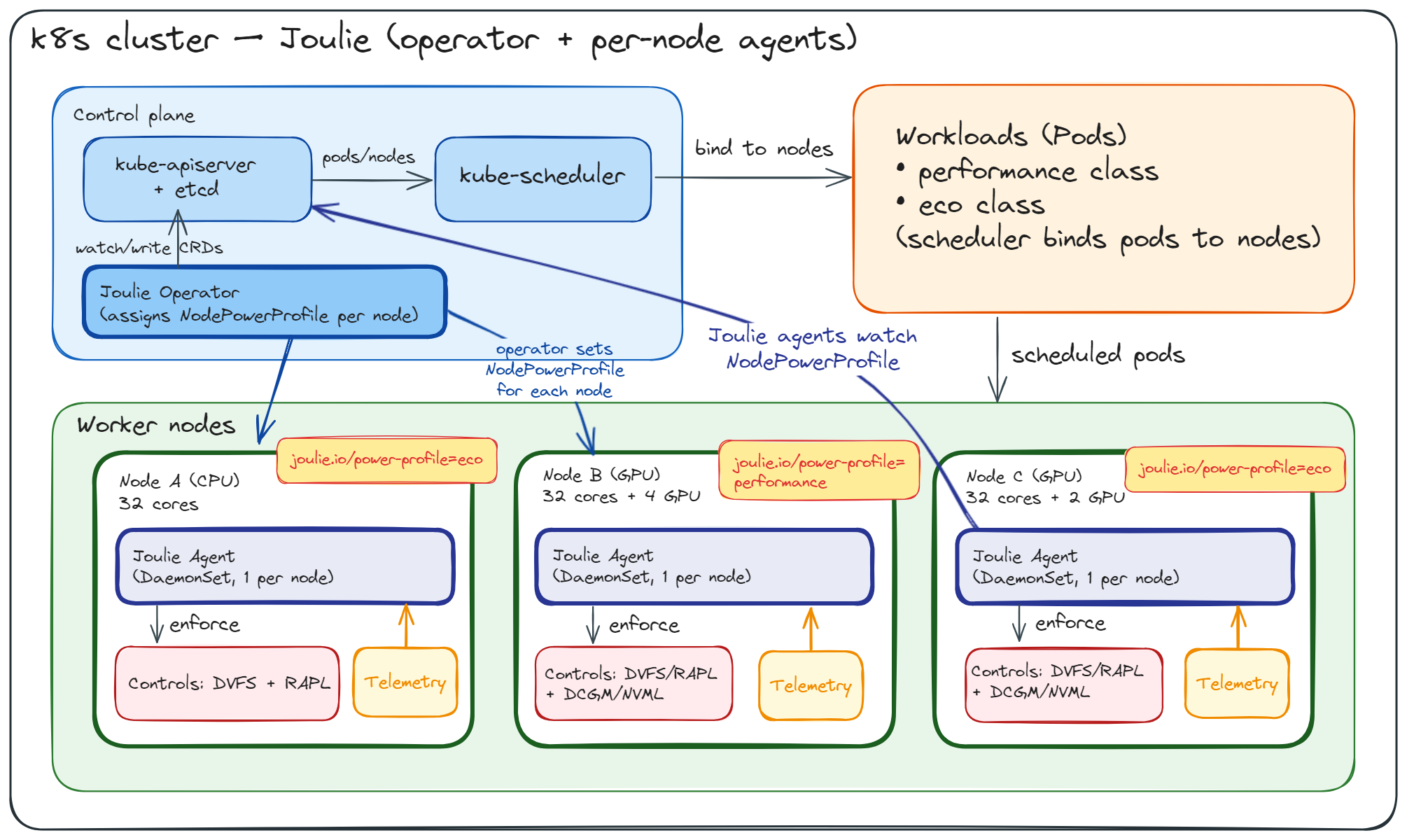
Central operator mode
The operator continuously writes NodePowerProfile assignments from the active policy (for example static partition or queue-aware), mapping desired states to node profiles (performance/eco).
Configuration details:
- CRD and Policy Model
- Operator
- Optional runnable manifest walkthrough:
Verify:
kubectl get nodepowerprofiles
kubectl -n joulie-system logs deploy/joulie-operator --tail=100
kubectl -n joulie-system logs -l app.kubernetes.io/name=joulie-agent --tail=100
Look for log lines containing desired-state source and enforcement/fallback actions.
Also verify installed images:
kubectl -n joulie-system get pods \
  -o custom-columns=NAME:.metadata.name,IMAGE:.spec.containers[0].image,IMAGEID:.status.containerStatuses[0].imageID
If operator logs show no eligible nodes matched selector, verify node labels:
kubectl get nodes --show-labels | grep 'joulie.io/managed=true'
Workload and Power Simulator
For fake-node workload + power simulation (real scheduler, fake KWOK nodes, real operator, agent pool mode), see:
Next step
Continue with: